Skip to content
Bookniapp iconBookniapp
English
Open menu

Everything Bookniapp does

Calendar, bookings, classes and events, clients and notifications, on web, iOS and Android. Start on the free plan and move to Pro when you want clients to book on their own.

TheProicon marks Pro plan features. If a feature has no icon, it is available on both plans.

First things first

Three ways to fill your calendar

Mix them however you like: they all live in the same calendar.

Service

A one-to-one appointment in a free slot of your calendar.

E.g. Haircut at 5:00 pm

Class

Sessions that repeat every week, with limited places.

E.g. Yoga on Mondays and Wednesdays at 7:00 pm

Event

A specific date with a capacity, in person or online.

E.g. Saturday workshop at 10:00 am

Bookings

Bookings around the clock, wherever people find you

With Pro, your clients see only free slots and book in a minute, from your profile, the app or Google. No phone calls, no back-and-forth messages.
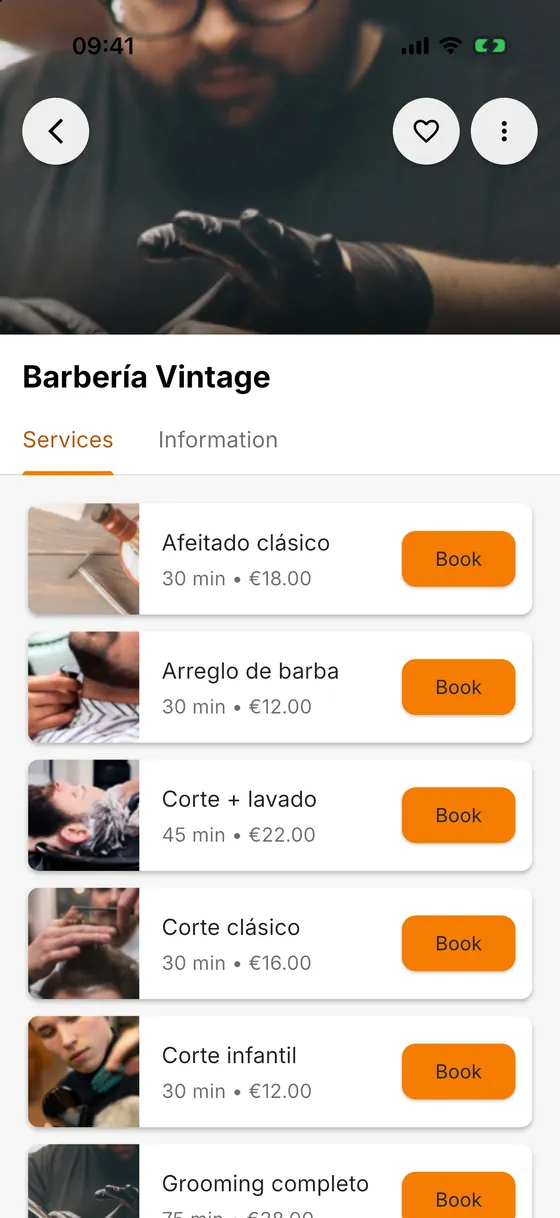
  • Clients book on their own, 24/7, from your profile, the app and Google.Pro
  • Only genuinely free times are offered: no more double bookings.
  • You appear in Explore, the app’s business search.Pro
  • Bookings without an account: guests book with just their name and email.Pro
  • With several professionals, the client picks who, or takes the first free slot.Pro
See all 11 features in this section
A business profile in Bookniapp with its services, prices and Book button

Calendar & team

A calendar that fits the way you work

Appointments, classes and events in the cloud, with no overlaps. Each calendar with its own hours and rules, and with Pro, your team running their own.

  • Unlimited calendars you can duplicate: per professional, room, cabin or equipment.Pro
  • Your team: each staff member signs in with their own email and manages bookings in their calendars.Pro
  • Weekly hours with several time ranges a day, holidays and special closures.
  • Cleaning or preparation time after each appointment, hidden from clients.
  • Google Calendar sync: your bookings, classes and events show up in Google, and what you move or cancel there changes here too.Pro
See all 23 features in this section
The day view in Bookniapp, with each professional’s appointments in their own colour

Classes & events

Classes with limited places and events, without paper lists

Set up a class once and it repeats every week. You see who is coming to each session and, with Pro, students sign up on their own.
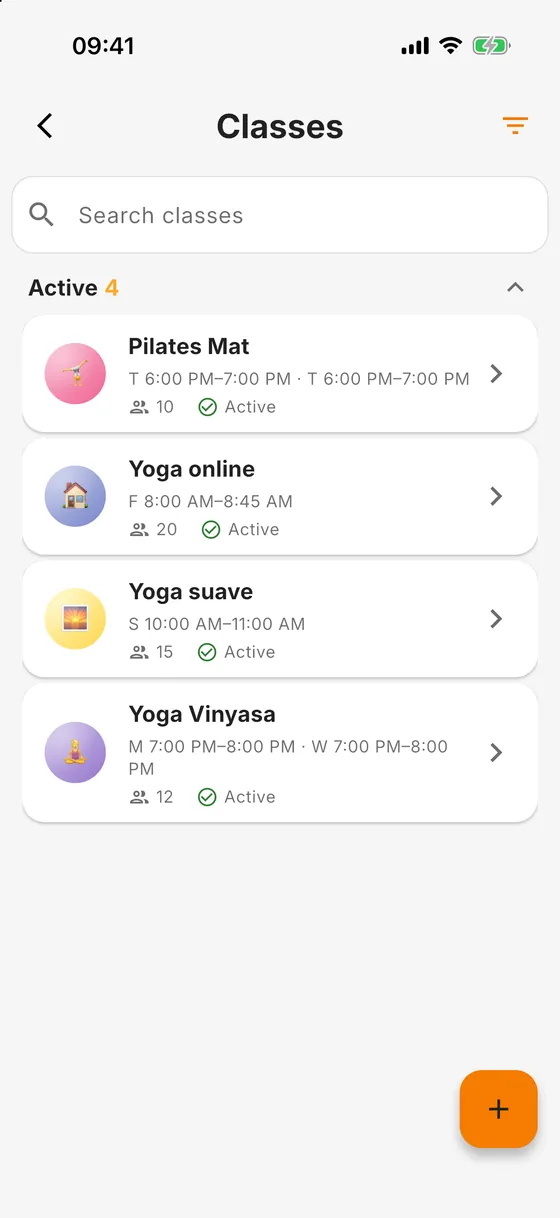
  • Weekly classes with places: each session closes itself when it fills up.
  • Clients sign up for classes and events on their own.Pro
  • The sign-up list for every session, ready before you start.
  • Cancel or reschedule a single session without touching the rest.
  • Events with a date and a capacity: workshops, tastings, talks or open days.
See all 14 features in this section
The class list in Bookniapp, with each weekly schedule and number of places

Clients

Every client, with their history

The client record creates itself with the first booking. You walk into every appointment knowing who they are, what was done last time and how often they have missed.
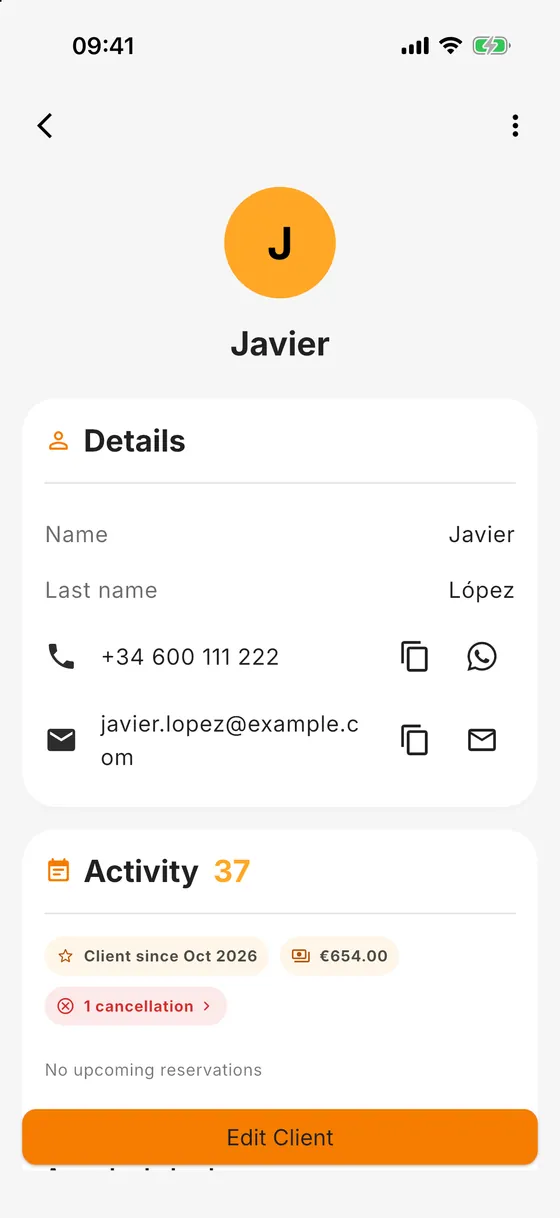
  • Automatic client record with contact details, notes and booking history.
  • At a glance: client since when, how much they have spent and how often they cancelled.
  • Call them, or message them on WhatsApp or by email, straight from the record.
  • Import your clients from your phone contacts, a CSV, a vCard or a pasted list.
  • Client tags: you decide which calendars each client sees.Pro
See all 8 features in this section
A client record in Bookniapp with contact details, total spend and booking history

Reminders

Notifications for you and your clients

You hear about every booking, change or cancellation, and so do your clients. With Pro, reminders go out on their own before every appointment.

  • Automatic reminders before every appointment, in the app or by email, from minutes to two days before.Pro
  • One-tap WhatsApp reminder from the booking itself: the message is already written.
  • The client is told when you create, move or cancel their booking, in the app or by email.
  • Clients you added by hand get it too, if they have an email address.
  • You are told about every new booking, cancellation or change.
See all 8 features in this section

Online sessions

Online consultations and classes

Work online with your own video call link or, with Pro, let Bookniapp create the Google Meet link for every appointment.

  • An automatic Google Meet link for every online appointment, class or event.Pro
  • Using Zoom or another platform? Paste your own link.
  • Clients join from their booking with one tap.
  • In-person and online appointments in the same calendar.
An online booking in Bookniapp with the button to join the video call

Insights

Know how your business is doing, without spreadsheets

Bookings, revenue, cancellations, occupancy and profile visits, by week, month or year.

  • Bookings and revenue, confirmed and pending, at a glance.
  • Cancellation rate, occupancy, new clients and returning clients.
  • Profile visits, so you know how many people find you.
  • Top services and top clients: what earns most and who comes back.
  • A monthly summary by email.
See all 7 features in this section
Monthly summary in Bookniapp with bookings, revenue, cancellations and occupancy

Your page & Google

Your page, on Google, on your website and at your venue

A public page with your link and QR code, and a page of your own on Google. On the free plan they help people contact you; on Pro, they let them book.

  • A public page with your services, contact details, location, payment methods and a WhatsApp button.
  • A page of your own on Google, with your details and services, so people find you.
  • A QR code for your profile, for the counter, the shop window or your business cards.
  • Share your profile link on WhatsApp, Instagram or anywhere else.
  • A booking widget for your website, in your colours and your font.Pro
See all 13 features in this section
A business profile QR code in Bookniapp, ready to share

Account & privacy

Your account, secure and in your language

The same account on web, iOS and Android, with two-step verification and full control of your data.

  • Web, iOS and Android with one account.
  • The app in 14 languages.
  • Two-step verification and control over the devices signed in to your account.
  • Sign in with Google or Apple.
  • Address hidden until booking: people see your area and a rough distance, and get the exact address when they book.Pro
  • Export your data (bookings, clients, catalogue, analytics) whenever you like.

What Bookniapp does not do

So you know exactly what you are getting.

  • It does not take payments online: you handle payment at your venue, with the methods shown on your profile.
  • It does not issue invoices: those are yours to make.
  • It is not clinical software: it does not keep medical records or structured health data.
  • It does not send text messages: notifications go through the app, email, or WhatsApp from your phone.
  • It has no waiting list.
  • It does not handle stock or product sales.

Every feature

99 features. Those with the shield are Pro; the rest are in both plans.

Bookings

11
  • Clients book on their own, 24/7, from your profile, the app and Google.Pro
  • Only genuinely free times are offered: no more double bookings.
  • You appear in Explore, the app’s business search.Pro
  • Bookings without an account: guests book with just their name and email.Pro
  • With several professionals, the client picks who, or takes the first free slot.Pro
  • On the free plan you create the bookings yourself, and your public page shows how to reach you.
  • Clients can move or cancel their booking without calling you.
  • Clients repeat a past booking in one tap.Pro
  • Confirmation by email and in the app for every booking.
  • Clients see your services grouped by category and can search your services, classes and events.
  • Spam protection on bookings made without an account.Pro
Go to the section ↑

Calendar & team

23
  • Unlimited calendars you can duplicate: per professional, room, cabin or equipment.Pro
  • Your team: each staff member signs in with their own email and manages bookings in their calendars.Pro
  • Weekly hours with several time ranges a day, holidays and special closures.
  • Cleaning or preparation time after each appointment, hidden from clients.
  • Google Calendar sync: your bookings, classes and events show up in Google, and what you move or cancel there changes here too.Pro
  • Minimum and maximum booking notice, and how many appointments can overlap.
  • With Google Calendar, what is busy in Google can block those times in your calendar.Pro
  • A team member can also book in their colleagues’ calendars, all or only some, seeing only whether times are free.Pro
  • The free plan includes 1 calendar, for appointments or classes.
  • Timeline or list view, filtered by calendar.
  • Slot interval: you decide how often a start time is offered.
  • Holiday templates to apply the same closures to several calendars.
  • Opening hours that run past midnight, for late-closing businesses.
  • Manual bookings for people who call you, even before they have a client record.
  • Several services in one booking, with the total worked out.
  • Edit, cancel with a reason, reactivate or repeat a booking in a few taps.
  • Export any booking to your personal calendar or Google Calendar.
  • Services with their own price, duration, image and VAT rate.
  • Duplicate services instead of starting from scratch.
  • Switch calendars and services on or off without losing their history.
  • Service categories: group your services, choose the order they appear in and how each one is sorted.
  • Change the category or calendars of several services at once.
  • “Price on request” for services without a fixed price.
Go to the section ↑

Classes & events

14
  • Weekly classes with places: each session closes itself when it fills up.
  • Clients sign up for classes and events on their own.Pro
  • The sign-up list for every session, ready before you start.
  • Cancel or reschedule a single session without touching the rest.
  • Events with a date and a capacity: workshops, tastings, talks or open days.
  • On the free plan, you add the attendees yourself.
  • In person or online, with the video call link included.
  • Appointments, classes and events in the same calendar, each in its own colour.
  • Event attendee list exportable to PDF.
  • A notification when a class or an event fills up.
  • Free or priced classes and events, with their VAT rate.
  • Share an event’s link, or duplicate it to run it again another day.
  • An automatic reminder to the client before their class or event.Pro
  • Guests without an account in classes and events too: they sign up with their name and email.Pro
Go to the section ↑

Clients

8
  • Automatic client record with contact details, notes and booking history.
  • At a glance: client since when, how much they have spent and how often they cancelled.
  • Call them, or message them on WhatsApp or by email, straight from the record.
  • Import your clients from your phone contacts, a CSV, a vCard or a pasted list.
  • Client tags: you decide which calendars each client sees.Pro
  • Quick booking from the record, without looking the client up again.
  • No-shows logged on their record, with a filter to list them.
  • Internal notes the client doesn’t see, and separately the notes they leave you when booking.
Go to the section ↑

Reminders

8
  • Automatic reminders before every appointment, in the app or by email, from minutes to two days before.Pro
  • One-tap WhatsApp reminder from the booking itself: the message is already written.
  • The client is told when you create, move or cancel their booking, in the app or by email.
  • Clients you added by hand get it too, if they have an email address.
  • You are told about every new booking, cancellation or change.
  • Push and email notifications, each with its own switch.
  • The confirmation email includes your business location.
  • Guests without an account, in classes and events too, get the confirmation, notifications and a reminder by email.Pro
Go to the section ↑

Online sessions

4
  • An automatic Google Meet link for every online appointment, class or event.Pro
  • Using Zoom or another platform? Paste your own link.
  • Clients join from their booking with one tap.
  • In-person and online appointments in the same calendar.
Go to the section ↑

Insights

7
  • Bookings and revenue, confirmed and pending, at a glance.
  • Cancellation rate, occupancy, new clients and returning clients.
  • Profile visits, so you know how many people find you.
  • Top services and top clients: what earns most and who comes back.
  • A monthly summary by email.
  • Weekly, monthly or yearly view.
  • Day-by-day revenue chart, split into confirmed and pending.
Go to the section ↑

Your page & Google

13
  • A public page with your services, contact details, location, payment methods and a WhatsApp button.
  • A page of your own on Google, with your details and services, so people find you.
  • A QR code for your profile, for the counter, the shop window or your business cards.
  • Share your profile link on WhatsApp, Instagram or anywhere else.
  • A booking widget for your website, in your colours and your font.Pro
  • Payment methods at your venue on display: cash, card, Bizum, bank transfer or others.
  • Links to Instagram, Facebook, TikTok, X, YouTube and LinkedIn on your profile.
  • Preset themes or custom colours for the widget.Pro
  • Choose the widget’s language; each client sees times in their own time zone.Pro
  • Turn the widget on or off without touching your website’s code.Pro
  • No commission on bookings that come from your website.Pro
  • Your Google page shows your services by category, with a search box when there are many.
  • Your Google page’s address, shown in the app so you can open or copy it.
Go to the section ↑

Account & privacy

11
  • Web, iOS and Android with one account.
  • The app in 14 languages.
  • Two-step verification and control over the devices signed in to your account.
  • Sign in with Google or Apple.
  • Address hidden until booking: people see your area and a rough distance, and get the exact address when they book.Pro
  • Export your data (bookings, clients, catalogue, analytics) whenever you like.
  • Business time zone and currency; each client sees times in their own zone.
  • A VAT-exempt business option.
  • Pause your business by switching off your public profile, without losing anything.
  • Step-by-step setup guides inside the app.
  • What’s new in each version, inside the app when you update.
Go to the section ↑

Frequently asked questions

What is the difference between the free plan and Pro?

Both include the full calendar. On the free plan you manage bookings yourself and your page shows how to reach you. With Pro, clients book on their own 24/7, get automatic reminders, and you can have unlimited calendars and team members with their own login. On this page, Pro-only features carry the Pro shield.

How much is Pro and how do I try it?

Pro costs €29.99/month, VAT included, with no lock-in and no commission per booking. You get a 1 month free trial, which you start from the app through the App Store or Google Play.

What is the difference between a service, a class and an event?

A service is a one-to-one appointment in a free slot of your calendar. A class repeats every week with limited places, and clients sign up session by session. An event is a specific date with a capacity.

Do my clients have to download the app?

No. With Pro they can book from your website, your page on Google or your profile link, in their browser, even without an account. And the app is always free for them.

Can I bring my existing clients?

Yes, on both plans. You can import them from your phone contacts, from a CSV or vCard file, or by pasting a list.

Start free. Move to Pro whenever you like

Free plan, or Pro at €29.99/month with a 1-month free trial · No lock-in · Cancel any time

Download appSee plans